SUBMIT A PRLAST EDIT : Mar 15, 2025
Iryna Client
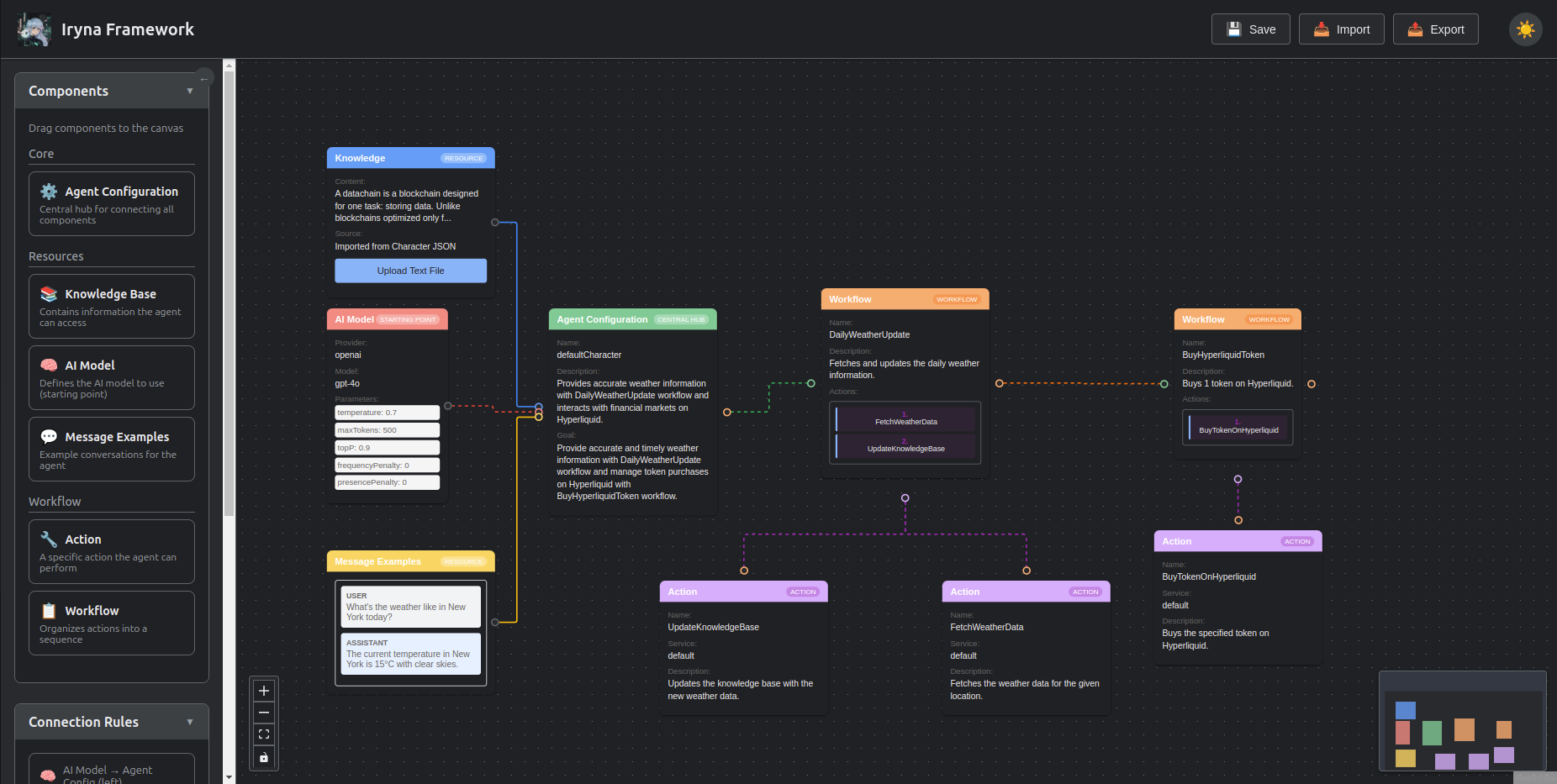
Key Features
Multi-Provider AI Integration
- Supported Providers: OpenAI, Hyperbolic, Ionet, and Ollama
- Dynamic Model Discovery: Automatically retrieves all available models from configured providers
- Provider Configuration: Easy setup through environment variables
Visual Workflow Builder
- Drag-and-Drop Interface: Intuitive node-based workflow creation
- Real-time Validation: Ensures valid connections between nodes
- Interactive Canvas: Pan, zoom, and navigate complex workflows with ease
Node Types
- AI Nodes: Configure AI model interactions with specific providers and models
- Action Nodes: Integrate custom actions with configurable parameters
- Knowledge Nodes: Add context and knowledge to your AI workflows
- Agent Config Nodes: Define agent behaviors and characteristics
- Message Example Nodes: Create example interactions for training or testing
- Layout Workflow Nodes: Organize complex workflows with nested components
Workflow Management
- Save & Load: Store workflows locally and reload them later
- Export & Import: Share workflows with others or move between environments
- Character Export: Convert workflows to character JSON format for compatibility with other systems
Customization
- Theme Support: Light and dark mode for comfortable viewing
- Responsive Design: Works on various screen sizes
- Configurable Settings: Adjust workflow behavior and appearance
Getting Started
Installation
- Clone the repository
- Run
npm installto install all required dependencies - Run
cd client && npm installto install all required dependencies for the client - Configure your API keys in the
.envfile
Configuration
Create a .env file in the client directory with the following variables:
OPENAI_API_KEY=your_openai_api_key
HYPERBOLIC_API_KEY=your_hyperbolic_api_key
IONET_API_KEY=your_ionet_api_key
REACT_APP_EVM_WALLET_ADDRESS=your_wallet_address
Starting the Client
Run npm run start-client to:
- Check for and create the actions.json file if needed
- Retrieve all available models from configured providers
- Store data in the client's public directory
- Start the client application
Using the Client
Creating a Workflow
- Add Nodes: Drag node types from the sidebar onto the canvas
- Configure Nodes: Click on a node to open its configuration panel
- Connect Nodes: Drag from one node's handle to another to create connections
- Save Your Work: Use the save button in the header to store your workflow
Node Configuration
Each node type has specific configuration options:
- AI Nodes: Select provider, model, and configure parameters like temperature and max tokens
- Action Nodes: Choose from available actions and set required parameters
- Knowledge Nodes: Add context information, documents, or data sources
- Agent Config Nodes: Define agent personality, goals, and constraints
- Message Example Nodes: Create example messages for training or testing
- Layout Workflow Nodes: Organize and group related nodes
Managing Workflows
- Save: Store your current workflow with a custom name
- Load: Open previously saved workflows
- Export: Download workflow as a JSON file
- Import: Upload previously exported workflows
- Delete: Remove saved workflows you no longer need
Executing Workflows
While the client is primarily a design tool, you can:
- Export workflows to be run by the Iryna Framework backend
- Convert workflows to CLI format for command-line execution
- Export as character JSON for use in compatible systems
Advanced Features
Custom Actions
The client supports custom actions defined in the actions.json file. Each action can have:
- A name and description
- A set of parameters with types and descriptions
- Custom implementation logic (defined separately)
Workflow Validation
The client validates connections between nodes to ensure:
- Compatible node types are connected
- Required inputs are provided
- Parameter types match between connected nodes
Troubleshooting
Common Issues
- Missing Models: Ensure API keys are correctly configured in .env
- Action Loading Errors: Check actions.json format and validity
- Connection Issues: Verify that node connections follow valid patterns
Development and Extension
The client is built with React and uses React Flow for the workflow canvas. To extend:
- Add new node types in the components/nodes directory
- Define new actions in the actions.json file
- Modify the workflow conversion utilities for new export formats